Top Signs Your Business Needs a Network Cabling Upgrade
A lot of network problems get blamed on internet service, Wi-Fi, or aging computers when the real issue is sitting behind the walls and above the ceiling tiles. Cabling is easy to ignore because, when it works, nobody thinks about it. Yet in many offices, warehouses, medical suites, retail spaces, and mixed-use commercial buildings, the physical layer is exactly where performance starts to slip.
I have seen businesses spend heavily on new laptops, upgraded switches, and faster fiber service, only to keep fighting slow file transfers, dropped VoIP calls, and unexplained outages. The culprit was not glamorous. It was a patchwork of old data cabling, poorly labeled runs, questionable terminations, and cable categories that no longer matched the demands of the business.
A network cabling upgrade is not always urgent, and it is not always all-or-nothing. Sometimes a few targeted replacements solve the problem. Other times, a full structured cabling redesign is the right call. The challenge is knowing when your current system has crossed the line from “good enough” to “holding us back.”
When the network feels unpredictable, not just slow
Most business owners notice obvious slowness. What they often miss is unpredictability. That is usually the more telling symptom.
If employees say the network works fine in the morning but drags after lunch, or one conference room always struggles during video calls, or a printer drops off the network for no clear reason, those patterns matter. Consistent slowness can come from bandwidth limits. Intermittent issues often point to physical network conditions, poor terminations, cable damage, or a cabling design that was stretched beyond its original use case.
In older office network cabling setups, especially those expanded over several tenant improvements or remodels, you often find a mix of legacy ethernet cabling categories, improvised patching, and runs that exceed recommended lengths. Each compromise adds a little instability. On paper the network may still “pass traffic,” but under real load it starts producing small failures that users experience as random frustration.
This is one of the first signs your business may need updated network cabling installation. Modern business operations depend on stable performance, not just average speed. Cloud platforms, VoIP phones, surveillance systems, access control, large file sync, and constant video conferencing all reveal weaknesses that older cabling could hide for years.
Your cabling no longer matches the speed of your hardware
A common scenario goes like this: the company upgrades to faster switches, installs better wireless access points, pays for a stronger internet circuit, and still does not get the performance expected. That gap often exists because the cabling infrastructure was built for an earlier era.
Many older buildings still rely on CAT5 or early CAT5e runs. In some cases, that may still support basic office tasks. In many others, it becomes the bottleneck. If you are trying to support multi-gigabit wireless access points, large backups, high-resolution video traffic, or data-heavy applications, old cable categories can quietly cap performance.
CAT6 cabling has become a practical standard for many commercial environments because it supports gigabit speeds comfortably and handles higher bandwidth demands better than earlier categories. CAT6A cabling goes further, especially where 10-gigabit performance, longer run stability, or future capacity matters. The right choice depends on the environment, budget, and how long you expect the buildout to serve the business.
I have worked in offices where a company invested in excellent Wi-Fi hardware but fed each access point through legacy horizontal cabling that could not reliably support the backhaul required. The result was a premium wireless system limited by subpar copper behind the walls. That kind of mismatch is more common than many people realize.
You are adding devices faster than the cabling plan can support
Years ago, a small office might have needed one data drop and one phone line per desk. That model is gone in many workplaces. Now a single workstation area may need connections for a computer, dock, VoIP phone, networked printer, badge reader, or an adjacent access point. In other spaces, security cameras, smart TVs, conference room equipment, point-of-sale systems, and IoT sensors add even more strain.
A network does not fail only because the cables are old. It also fails because the original design no longer reflects how the space is used.
This becomes obvious when people start using unmanaged mini-switches under desks because there are not enough ports, or when extension patching appears in closets because no one planned for growth. Both are warning signs. They are often treated as harmless workarounds, but they usually create confusion, introduce troubleshooting headaches, and reduce reliability.
A proper structured cabling system gives each device type a clear path back to the network room or telecommunications closet. It allows changes without guesswork. If your business has outgrown its original footprint or has changed how departments work, your low voltage cabling layout may need to be redesigned, not merely patched.
Moves, adds, and changes have become messy and expensive
One of the easiest ways to spot aging cabling is to look at how your team handles routine changes. If every office shuffle turns into a half-day project, if technicians spend too much time tracing unlabeled runs, or if no one is entirely sure which patch panel ports serve which desks, the cabling system is costing you money even when there is no outage.
Well-planned data cabling is not only about raw speed. It is about manageability.
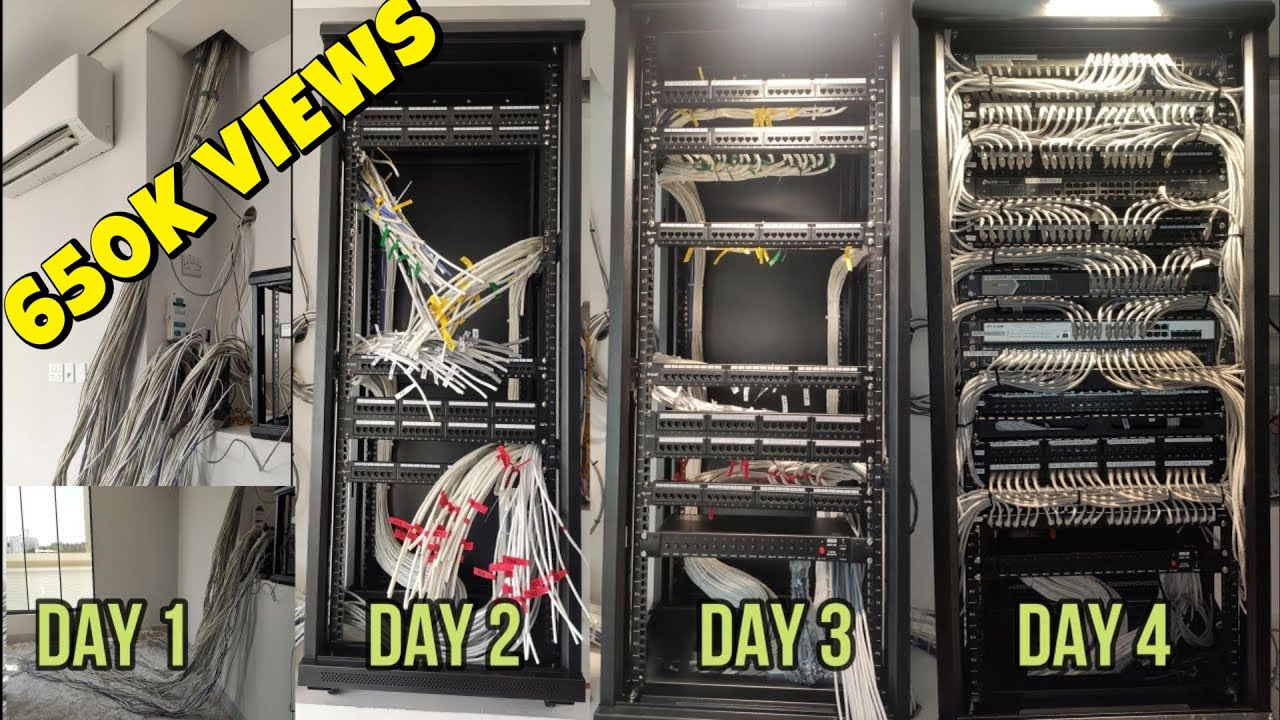
In a healthy setup, moves, adds, and changes are straightforward. Labels are readable and consistent. Patch panels are organized. Cable pathways make sense. The rack is not a knot of old jumpers and mystery lines. Technicians can identify a run quickly and test it without disrupting unrelated users.
In a neglected environment, simple changes turn risky. A contractor disconnects the wrong port. A conference room loses service because its patching was daisy-chained through a closet nobody documented. A new employee gets seated at a desk where the jack has not worked for months, but no one knew because the previous occupant lived on Wi-Fi.
These are not dramatic failures, yet they drain time, delay onboarding, and increase support costs. When your business network installation becomes hard to manage, that is a real operational sign that the cabling backbone needs attention.
Voice and video quality is getting worse
Users are often more forgiving of a slow download than a choppy phone call. Poor voice and video performance exposes cabling issues quickly because real-time traffic is less tolerant of packet loss, jitter, and intermittent link problems.
If your team regularly hears phrases like “you’re breaking up,” “your video froze,” or “we lost the room system again,” do not assume the problem is always the conferencing platform. Internal network quality matters. So does the quality of the physical cabling between endpoints, switches, and uplinks.
This becomes especially important in buildings with heavy Power over Ethernet usage. Many modern devices rely on PoE, including phones, cameras, wireless access points, door controllers, and some digital signage. Inferior terminations, damaged cable jackets, bundles installed without proper attention to heat and pathway limits, or simply outdated cable types can all create trouble under load.
CAT6A cabling can be particularly valuable in PoE-heavy environments because it offers improved performance margin and can better support higher-demand applications when designed and installed correctly. That does not mean every business needs CAT6A everywhere. It does mean that if your communication tools are business-critical, the cabling deserves more scrutiny than it usually gets.
Certain areas of the building always have issues
When the complaints cluster by location, pay attention. Maybe the second floor always has unstable service. Maybe the warehouse office loses connectivity whenever equipment is running nearby. Maybe one wing of the building cannot keep camera links online through summer heat.
Location-based patterns often point to physical installation conditions. I have seen network cabling routed too close to electrical interference sources, squeezed into overloaded pathways, bent too tightly around corners, or extended through spaces that were never suitable for long-term cable health. In industrial or semi-industrial settings, vibration, moisture, dust, and temperature swings can all shorten the useful life of low voltage cabling if the original install did not account for them.
This is where professional testing matters. A cable can appear connected and still underperform. Certification, not just continuity checks, helps reveal whether the installed cabling actually supports the transmission requirements your business depends on.
If only certain zones misbehave, you may not need a full building overhaul. Targeted replacement of those specific runs, pathways, or terminations could solve the issue. The key is not to dismiss repeated location-specific symptoms as bad luck.
You are relying too heavily on Wi-Fi to compensate
Wireless is essential, but it is not a substitute for sound cabling. In fact, strong Wi-Fi depends on strong cabling because every access point needs a reliable wired connection to the network.
Businesses often try to work around weak office network cabling by shifting more users and devices onto wireless. That can keep things functioning for a while, but it usually compounds the problem. Access points become overloaded, roaming performance suffers, and applications that need stable low-latency connections start to struggle.
Conference room systems, desktop docks, production workstations, VoIP phones, and fixed business devices still benefit enormously from ethernet cabling. Even in highly mobile environments, the wired backbone carries the real burden.
If your IT team keeps hearing “just put it on Wi-Fi” because the wired network is too unreliable or too limited, that is not efficiency. It is a warning.
Your building has been remodeled multiple times
Renovations create strange cabling histories. A suite starts as one tenant layout, then becomes two offices, then gets rejoined, then adds a conference room where storage used to be. Over time, the cabling reflects every phase of that evolution.
You end up with abandoned cable runs above ceilings, old wall jacks that were never decommissioned properly, temporary extensions that became permanent, and pathways that violate current best practice. None of that may be visible to end users, but technicians see it immediately.
This matters for more than neatness. Mixed-era cabling makes troubleshooting harder and future upgrades more expensive. It also raises questions about code compliance, firestopping, pathway capacity, and whether the installed plant can support present demand.
If your space has been modified repeatedly and no one has taken a fresh look at the full structured cabling system in years, a professional assessment is usually worth the effort. Even if you do not replace everything now, knowing what you actually have is the first step toward making sound decisions.
Your uptime matters more than it used to
Not every small business needs enterprise-grade redundancy. But many organizations quietly become more dependent on network availability than they were five years ago.
A dental practice running digital imaging, a law office depending on cloud document systems, a retail operation tied to online inventory, or a logistics business coordinating real-time shipments can lose serious money from network interruptions that once would have been minor annoyances. The same is true for companies with hybrid teams, hosted https://lannetwork923.opalvector.com/posts/cat6-cabling-installation-mistakes-that-can-hurt-network-speed phone systems, or surveillance and access control tied into the data network.
When the cost of downtime rises, the tolerance for aging cabling should fall.
That does not always mean a complete rip-and-replace. Sometimes the answer is replacing critical backbone runs, upgrading core closets, cleaning up patching, and reterminating questionable endpoints. But if the physical network has become a single point of failure, ignoring it becomes an expensive gamble.
You are seeing frequent port failures, bad terminations, or patching issues
A good network technician can often tell within minutes whether an environment has outgrown its cabling. The clues are small but consistent: loose keystones, kinked patch cords, mislabeled ports, hand-crimped patch cables where factory-tested cords should have been used, wall plates that no longer hold securely, or switches showing repeated link negotiation problems.
Those details matter because they reveal whether the cabling system has been maintained as infrastructure or treated as an afterthought.
Here are a few practical signs that usually justify a closer look:
- Users regularly lose connectivity at the same jack or desk area.
- Patch panels and outlets are unlabeled, mislabeled, or impossible to trace.
- Devices fail to negotiate expected speeds and keep falling back to lower link rates.
- VoIP phones, cameras, or access points reboot unexpectedly because of unstable PoE delivery.
- Testing shows marginal or failed runs even after equipment has been replaced.
None of these automatically means every cable in the building is bad. Together, they usually mean the cabling environment is no longer dependable enough for business use.
Compliance, safety, and insurance concerns are starting to matter
This is not the first topic owners think about, but it comes up more often than expected. Poorly managed cable installations can create code and safety issues, especially after years of informal changes. Plenum spaces may contain the wrong cable types. Penetrations may not be firestopped properly. Abandoned cable may exceed what should have been removed. Pathways may be overloaded or unsupported.
In some industries, documentation and physical infrastructure standards also matter for audits, tenant requirements, or insurance reviews. If you are expanding into healthcare, finance, multi-tenant commercial property, education, or light industrial operations, an ad hoc cabling environment may become a business risk.
A reputable network cabling installation contractor should understand not just terminations and testing, but pathway planning, labeling, documentation, code awareness, and long-term maintainability. The value is not merely a cleaner rack. It is reduced risk.
Growth plans are forcing the question anyway
Sometimes the clearest sign you need an upgrade is that you are about to make another investment around the network. Maybe you are adding a floor, opening a second suite, building a warehouse office, installing more cameras, replacing the phone system, or moving more services to the cloud. Those projects all depend on reliable physical connectivity.
That is the moment to evaluate whether your existing data cabling can carry the next phase of the business. Waiting until after the expansion often means paying twice, once for the rushed workaround and again for the proper fix.
A thoughtful cabling review before expansion usually covers device counts, switch location, uplink needs, closet power and cooling, PoE budgets, cable category selection, pathway capacity, and how much future headroom to build in. Those discussions are far less expensive before drywall closes and furniture gets installed.
Choosing between partial remediation and full replacement
Business owners often fear that any cabling issue means a total rebuild. Sometimes it does. Often it does not.
A partial project makes sense when the problems are concentrated, the backbone is still healthy, and the space is relatively stable. A full structured cabling upgrade makes more sense when the site has mixed generations of cable, ongoing growth, poor documentation, or chronic reliability issues spread across multiple areas.
The right path usually depends on a few practical questions:
| Question | What it helps determine | |---|---| | Are the issues isolated or building-wide? | Whether targeted repairs are realistic | | What cable category is in place now? | Whether current runs can support planned speeds | | How important is uptime? | Whether margin and redundancy should be added | | Are you renovating or expanding soon? | Whether it is smarter to upgrade now | | Is the current system documented and testable? | Whether maintenance is still efficient |
This is where experience matters. A competent contractor will not automatically push the largest project. They should be able to explain what can be salvaged, what should be replaced, and where spending more now will save money later.
What a well-timed upgrade usually improves
When a business upgrades ethernet cabling and related low voltage cabling correctly, the benefits show up in everyday operations before anyone talks about technical specs. Calls stabilize. Access points perform as expected. New employees get seated faster. Conference rooms stop being a gamble. IT spends less time chasing intermittent faults. The network becomes boring, which is exactly what you want.
A good upgrade also creates room for future moves. If you are already opening ceilings or touching walls, it often makes sense to add a bit of capacity beyond today’s minimum. A few spare runs to high-demand areas, cleaner closet layouts, and better labeling can extend the usefulness of the investment for years.
That said, more is not always better. I have seen businesses overspend on cable categories and density they did not need, while neglecting documentation, testing, and pathway quality. The best business network installation is not the one with the flashiest specification. It is the one that matches actual use, supports growth, and stays maintainable.
The quiet cost of waiting too long
Cabling problems rarely fail all at once. They erode confidence little by little. A dropped call here, a failed camera there, a desk that “never really worked right,” an access point that underperforms, a closet nobody wants to touch. Because the pain arrives in fragments, many businesses normalize it.
That is what makes delayed upgrades expensive. The cost is not only in emergency repairs. It shows up in lost staff time, slower support, frustrated clients, postponed projects, and the habit of building workarounds around infrastructure that should have been fixed.
If your network feels less dependable than your business needs it to be, the physical layer deserves a serious look. Cabling is not the most visible part of IT infrastructure, but it is one of the few parts that every application, every call, every camera, and every connection must pass through. When it starts showing its age, the signs are usually there well before a major outage forces the issue.
Fontana Tech Pros provides professional network cabling installation, structured cabling, fiber optic installation, commercial WiFi, access control, security camera installation, alarm systems, and phone system solutions for businesses throughout Southern California. Learn more at https://fontanatechpros.com/.
Fontana Tech Pros specializes in reliable network cabling solutions for commercial offices, warehouses, schools, and industrial facilities. Our experienced team delivers high-quality structured cabling and low-voltage installations designed for long-term performance.